
Custom exchanger shape: air flux angle
Quick guide for Coils 6
1. What it does
The Custom exchanger shape now has an Air flux angle field. When you type the angle between the air flow and the coil, Coils calculates the Security factor by linear interpolation between the factors of the predefined shapes 90° Flux, 60° Flux and 45° Flux.
Before this change you had to type the security factor of a custom shape by hand. You can still do that.
2. Where to find it
In the calculation window, click the Exchanger options button. The window opens on Exchanger shape.
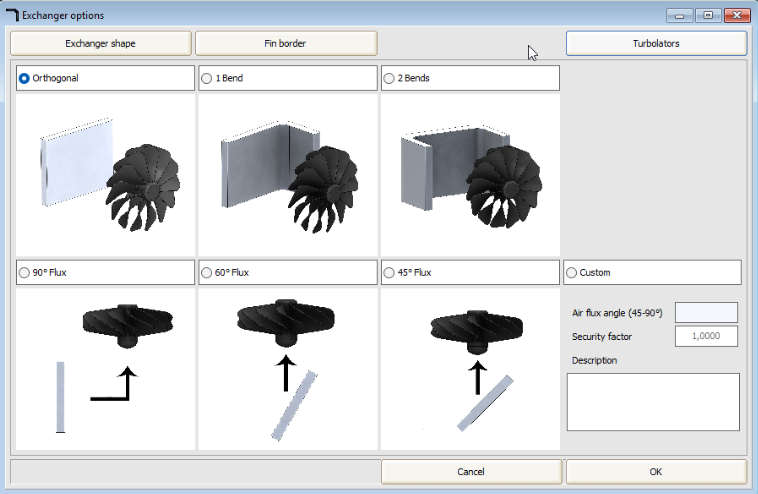
3. How to use it
- Select Custom (1).
- Type the angle in Air flux angle (2), in degrees. The label shows the allowed range, for example 45-90°.
- The Security factor (3) is updated while you type.
- If necessary, change the security factor by hand. Coils uses the value in this field for the calculation.
- Optionally type a Description (4), for example the reason for the angle.
- Click OK (5) and calculate the coil again.
4. Rules
- An angle above the maximum is set to the maximum at once. An angle below the minimum is set to the minimum when you leave the field.
- The range and the factors come from the predefined flux shapes in the Coils database. If Unilab changes those factors, the interpolation follows them.
- If you delete the angle (empty field), the security factor goes back to 1. You can then type a factor by hand, as before.
5. Saving and reopening
The angle, the security factor and the description are saved in the project file. When you open the project again, the window shows the saved angle and keeps the saved factor, also if you changed it by hand. Projects saved with an older Coils version open with an empty angle.